


As organizations scale their data strategies in Qlik Cloud, choosing the right storage format becomes increasingly important for performance, cost-efficiency, and flexibility. Traditionally, QVD files have been the go-to choice for Qlik developers due to their speed and tight integration within the platform.
At the same time, the rise of open standards like Parquet, especially in cloud and Lakehouse environments, offers new possibilities.

This insight explores how QVD and Parquet compare in terms of file size and load performance, helping you make informed decisions based on your data architecture needs.
Qlik Cloud data formats: proprietary vs. open standards
- A QVD (QlikView Data) file is Qlik’s proprietary, high-performance data storage format, designed for fast and efficient data loading within Qlik Sense (and QlikView). It stores both data and metadata in a compressed structure, enabling rapid access, strong governance, and reusability across multiple applications.
- A Parquet file is an open-source, columnar storage format designed for efficient data processing and analytics at scale. It is optimized for read-heavy operations, allowing queries to scan only the necessary columns, which improves performance and reduces storage costs, especially with large, complex datasets. In Qlik Cloud, Parquet enables seamless integration with external cloud storage and open data architectures, making it ideal for organizations embracing a hybrid or multi-platform analytics strategy.
QVD vs. Parquet: A multi-codec storage comparison
To better understand the impact of file format and compression on storage efficiency, we conducted a comparison using three datasets of varying sizes, small (2,500 records), medium, and large (over 61 million records). Each table was saved in Qlik Cloud in both QVD and Parquet formats. For the Parquet files, we applied all seven supported compression codecs: uncompressed, Snappy (Qlik’s default), Gzip, LZ4, Brotli, Zstandard (ZSTD), and LZ4_Hadoop.
This approach allowed us to evaluate how each compression method affects file size and performance across different data volumes, providing a practical perspective on optimizing storage strategies in Qlik Cloud.
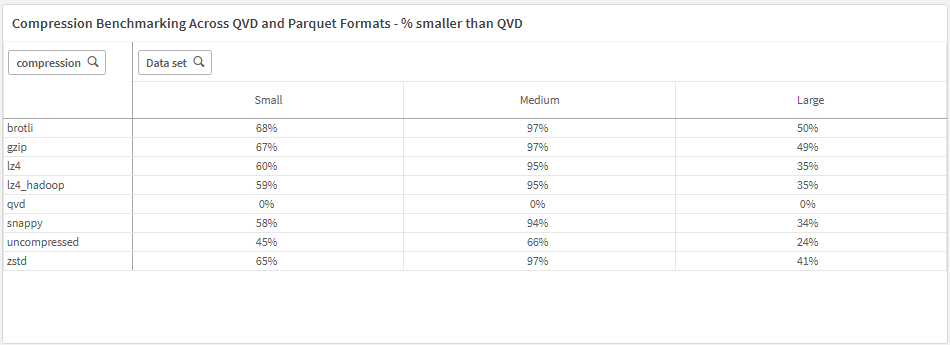
Compression benchmarking across QVD and Parquet formats
One of the most notable findings from our compression experiments is the substantial difference in file size between Parquet and QVD formats. When applying compression, Parquet files consistently demonstrated a significantly smaller storage footprint. Our benchmark tests across datasets of varying sizes clearly highlight Parquet’s superior efficiency in compression compared to QVD.
Important consideration when using Parquet files in Qlik Cloud
While Parquet offers significant advantages in terms of compression and flexibility, there are important considerations to keep in mind, particularly regarding data type consistency.
In many QVD files, it's common to encounter fields containing mixed data types (e.g., both numeric and text values). However, Parquet files enforce strict data typing and do not natively support such mixed-type fields. In short: Parquet expects a column to contain only one data type, and if your data isn't clean, you can lose data or run into compatibility problems.
When migrating from QVD to Parquet, it is essential to validate field types beforehand and, where necessary, apply data cleansing or transformation steps to ensure type consistency. Failing to do so could compromise data integrity in downstream Qlik applications.
Benchmarking load operations in Qlik: A Parquet vs QVD analysis
Another key aspect of our experiment focused on load performance in Qlik.
To evaluate this, we conducted a series of load scenarios in Qlik Sense Cloud, including: Full Load (Optimised), Field Selection (Optimised), Filtering with a WHERE Clause (Optimised), Filtering with a WHERE Clause (Not Optimised), Field Selection and Filtering with a WHERE Clause (Not Optimised), and Aggregation (Not Optimised). These scenarios provided a comprehensive view of how each file format handles various data retrieval and transformation operations, with a particular focus on whether Qlik was able to perform an optimised load.
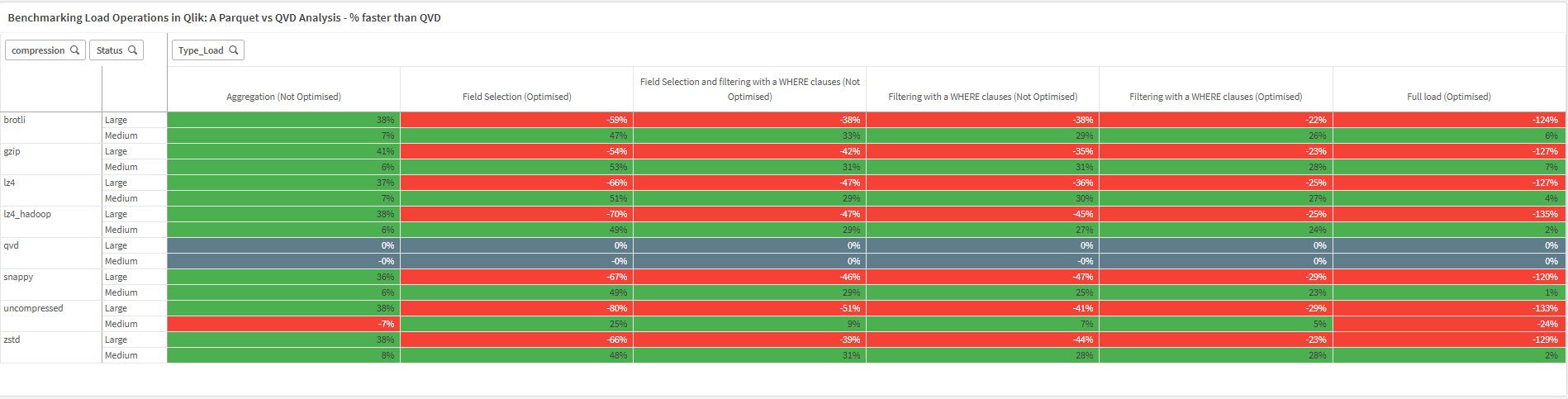
Our performance benchmarks revealed:
- Parquet files, particularly when efficiently structured and compressed, often outperformed QVDs in specific scenarios—most notably during aggregation operations and when applying WHERE clauses on small to medium-sized datasets.
- QVD files are optimized for seamless integration and fast loading within Qlik. They performed better in full data loads (optimized load) and in filtered queries on very large datasets using WHERE clauses.
These findings highlight that load performance is scenario-dependent, with Parquet offering competitive, and at times superior, performance even within a Qlik environment.
Conclusion
Considering Qlik’s capacity-based pricing model and the fact that Parquet files, when compressed, consistently show a significantly smaller storage footprint, we can expect a positive impact on both cost and storage efficiency. Performance-wise, Parquet is on par with QVD files, making it a strong alternative.
Therefore, we can confidently say that Parquet files are more than just a viable substitute for QVDs. While some long-time Qlik enthusiasts might feel a bit nostalgic about moving away from QVDs, the benefits of Parquet, especially in modern data architectures, are hard to ignore.