

1. Conversational BI in Microsoft Fabric: Stop Navigating Dashboards, Start Asking Questions
Business users spend hours navigating dashboards, only to leave without the answers they needed. The data is there — but the answer is not.
Why do traditional dashboards often fail to provide the right insights?
Insights often get lost in ways that are all too familiar:
- Data is scattered across report pages, requiring users to manually combine information.
- Insights are hidden behind filters that were never designed with the user's specific question in mind.
- High effort is required to cross-reference multiple reports into one meaningful answer.
- The "Last Mile" gap: The insight exists in the semantic model but never made it into a visual report at all.
Microsoft Fabric is changing that. With tools like Microsoft Copilot and the Fabric Data Agent, business users can now ask questions in plain language and get immediate, data-driven answers — no need to learn technical skills or wait for a data analyst.
But here's what most people miss: the difference between a Conversational BI setup that frustrates users and one that truly unlocks value lies entirely in which tools you use and how they are configured.
In this insight, we break down the options Fabric offers, the pain points they solve, and how to set them up so your data actually starts working for the people who need it most.
2. What are the conversational BI tools available in Microsoft Fabric
Microsoft offers two native tools that allow end users to "chat" with their data:
- Microsoft Copilot: This can be embedded directly in your existing Power BI reports or used as a standalone chatbot within your workspace.
- Fabric Data Agent: A more customizable option that can be displayed in a report or used by Copilot standalone to handle specific queries.
This insight evaluates the performance of both options and provides practical tips for their setup.
3. How do you get started with Microsoft Copilot
The most accessible entry point into Conversational BI in Microsoft Fabric is Microsoft Copilot. Whether embedded inside Power BI reports or used as a standalone experience, its biggest selling point is simplicity.
How easy is the setup?
Getting started is straightforward:
- Provision a Fabric capacity.
- Assign it to your workspace.
- Enable the feature in your tenant settings.
No complex configuration or custom development is required to go live. Once activated, Copilot can answer questions about the report or its underlying semantic model, and can even construct DAX expressions to surface new insights on the fly.
How can you optimize the semantic model for Copilot?
To get the most out of it, you should enrich your semantic model upfront with:
- Descriptions on tables and columns so Copilot understands what the data represents
- Synonyms to help Copilot match business terminology to the underlying data model
How does Microsoft Copilot perform in a real-world scenario?
This all sounds like an easy and promising way to get more value out of your data, but this might be too good to be true. I put Copilot to the test using our internal timesheet and planning data and I noticed that it struggled. A straightforward question — "How many days was Artur Tyvaert booked on element61 in 2026?" — went unanswered, despite the data being available in the model.
Why does Copilot sometimes fail to deliver?
While there is some transparency (you can inspect filters and used data), the real frustration lies in the lack of control. When Copilot gets it wrong, there is currently:
- No way to add custom instructions to steer the logic.
- No ability to provide examples of "correct" answers (few-shot prompting).
- No mechanism to guide or correct it for future interactions.
So is Microsoft Copilot the right tool for Conversation BI?
No! For organizations looking for a quick win, Copilot looks like an appealing starting point. However, in its current state, it is not the right tool for providing Conversational BI to business users.
The main reason is a lack of control and persistence. When Copilot fails to answer a question correctly—even if the data is right there—you are left hoping it performs better on the next attempt.
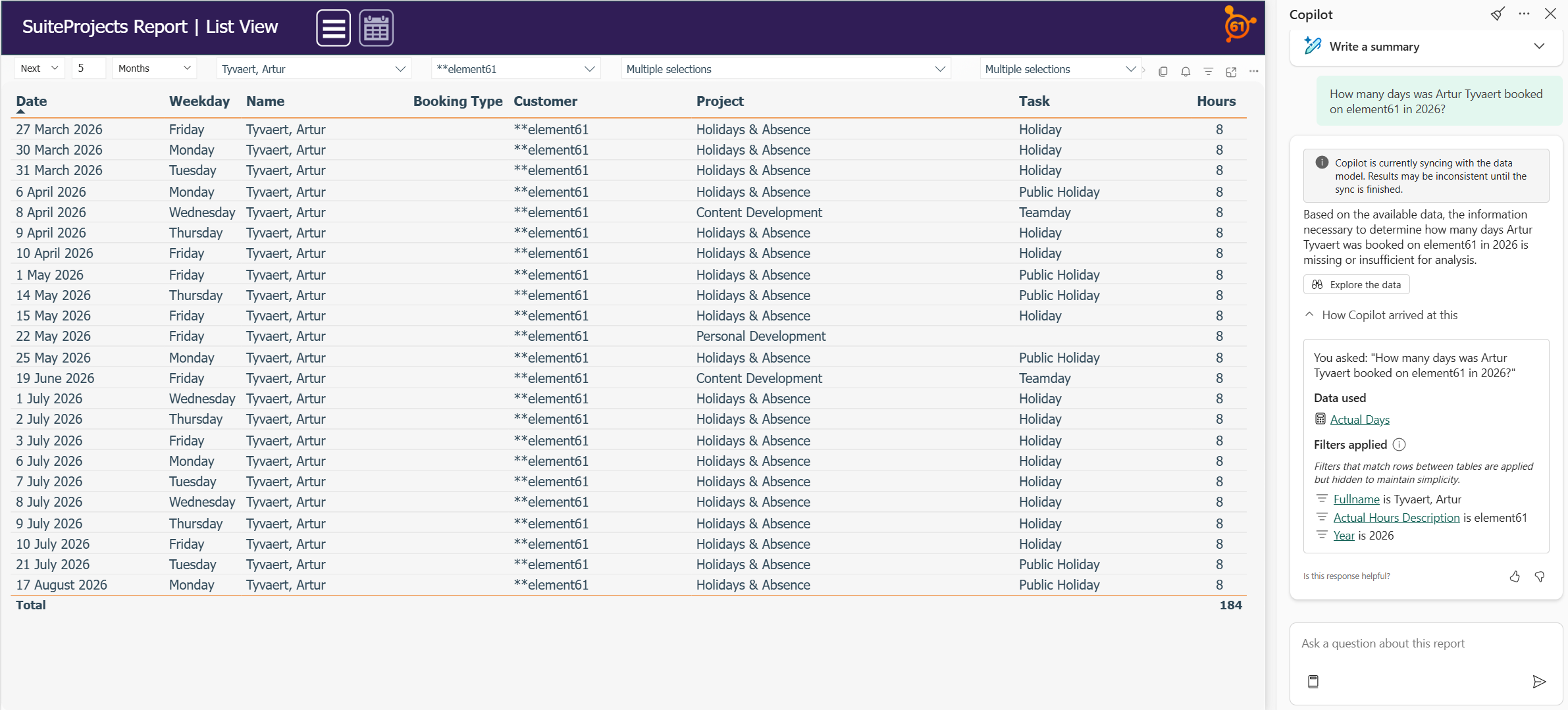
Figure 1: "How many days was Artur Tyvaert booked on element61 in 2026?" in Power BI mode
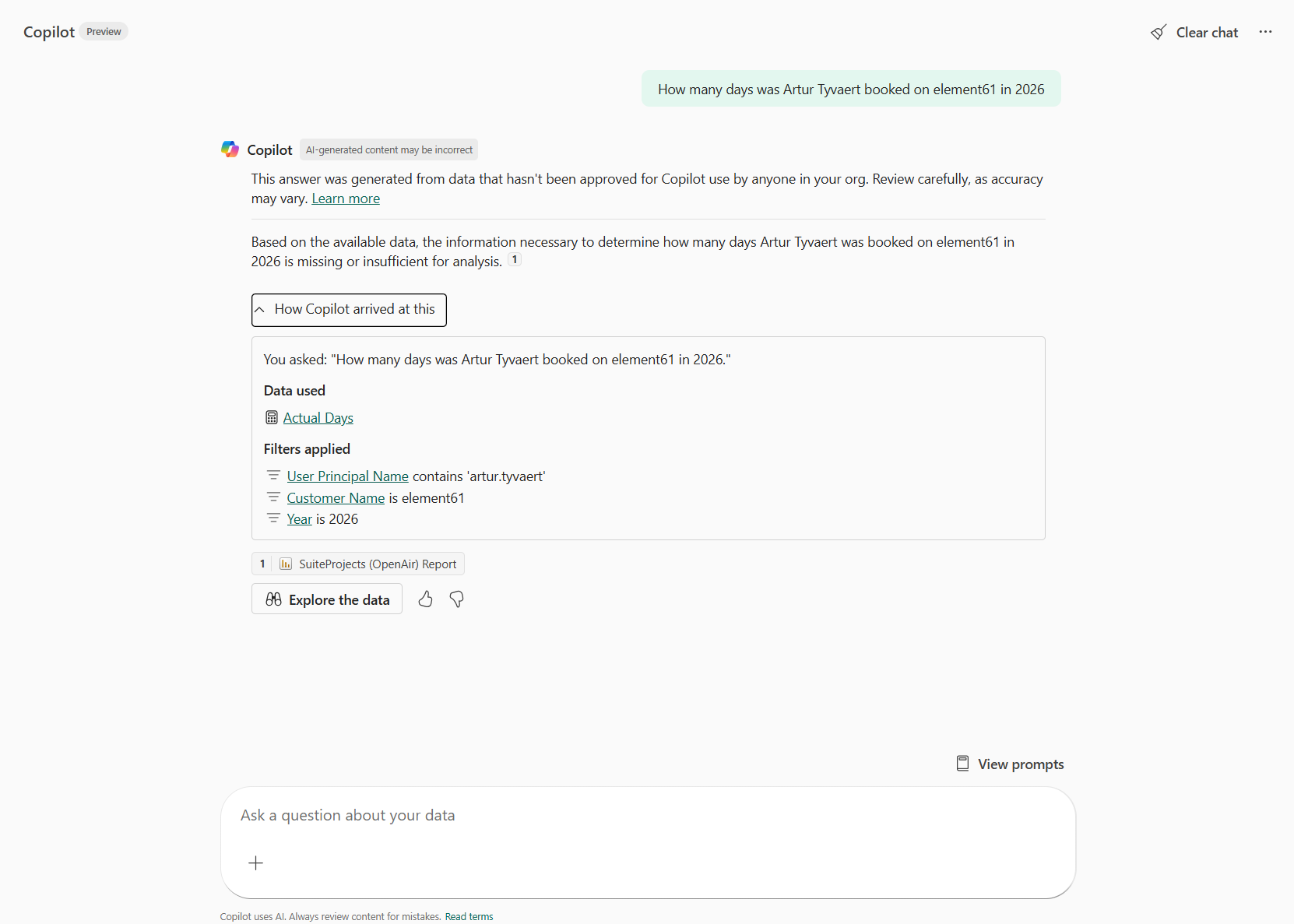
Figure 2: "How many days was Artur Tyvaert booked on element61 in 2026?" in Standalone mode
The examples above also illustrate another uncomfortable truth: Copilot is unpredictable. Asked the same question twice on the same data, it applied different filters to generate its answers. With no control over these important decisions, it remains a black box — and a black box is a hard sell to business users who need to trust what they are looking at.
What is the best use case for Microsoft Copilot in Fabric?
Does this make Copilot a failed product? Not at all. It just means you need to use it in the right scenario.
Picture this: your organization has built a rich landscape of reports across multiple workspaces. A business user needs information, but finding it feels like an endless search. This is where Copilot genuinely shines. Rather than answering complex data questions, it acts as a guide through your reports and workspaces, pointing users to exactly the right report and page.
When tested with this use case — "Where can I find the bookings of Artur Tyvaert?" — Copilot delivered a fast, accurate answer, returning a clear list of relevant reports. However, asking a follow-up analytical question about those bookings immediately brought back the familiar frustration: a long wait, followed by an empty result.
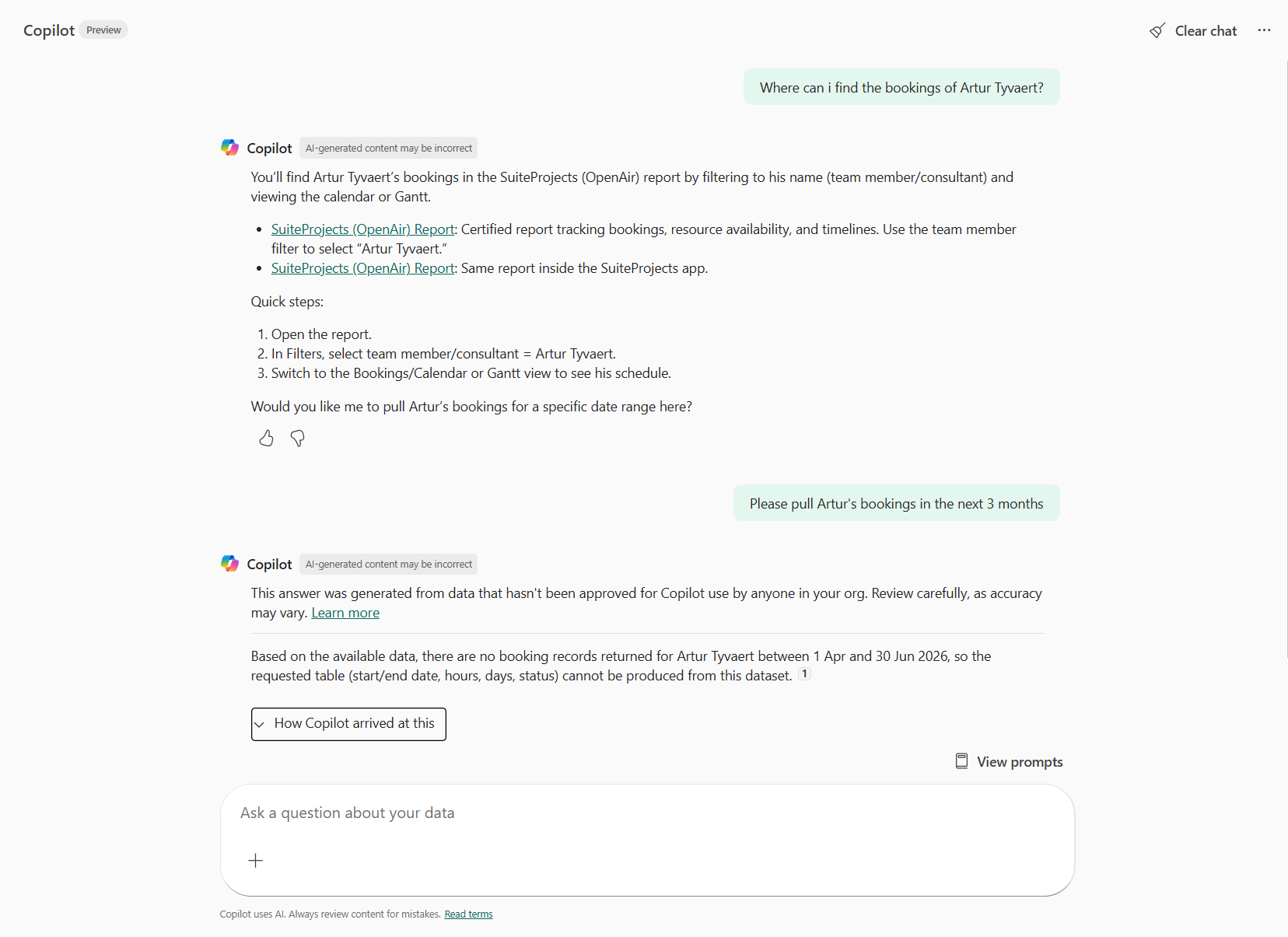
Figure 3: Use Copilot as a guide through your different reports and workspaces
That contrast tells the whole story. Copilot excels at navigation. It struggles with analysis. Use it to guide users to the right report, not to replace the report itself — and you will save your business users a great deal of frustration.
4. Why should you use a Fabric Data Agent for Conversational BI in Fabric
For organizations that need more than just a guide, the Fabric Data Agent fills the gap that Copilot leaves behind. It is designed for Conversational BI with a higher level of control and precision.
4.1 How do you choose the right foundation for a Fabric Data Agent
Before configuring your Fabric Data Agent, the most important decision comes first: where does your data come from? This choice directly influences four things that determine whether your Conversational BI solution succeeds or frustrates:
- Answer speed: How fast the user gets a response.
- Business context: The amount of metadata and logic available to the agent.
- Value matching: How well the agent links user terms to data values.
- Ease of debugging: How quickly you can find out why an answer was wrong.
... and ultimately the quality of the answers your end users receive.
What are the different source types for a Fabric Data Agent?
A Fabric Data Agent can be built on top of five different source types:
- Warehouse
- Lakehouse
- KQL Database
- Fabric IQ (Ontology)
- Power BI Semantic Model
To make this comparison concrete, I built two Fabric Data Agents side by side — one on top of a Lakehouse (representing SQL-based sources) and one on top of a Power BI Semantic Model — both fed with identical data. The Lakehouse was chosen as the representative for the SQL-based sources, as its setup closely mirrors that of a Warehouse and KQL Database.
Here is how they compare across the dimensions that matter most.
| Lakehouse/ Warehouse/ KQL | Power BI Semantic Model | |
|---|---|---|
| Query language | SQL/ T-SQL/ KQL | DAX |
| Answer speed | Fast | Slightly slower |
| Business context | Must be added manually | Already embedded in measures |
| Value matching of user terminology to stored | Matches only — gaps must be manually bridged | Semantic layer bridges terminology and stored values |
How do Lakehouse and Semantic Model foundations affect answer quality?
To determine how the choice of foundation influences the final result, I configured both approaches with identical settings, examples, and context.
I then put both agents to the test with two specific questions:
- “Give me a top 10 of the employees with the most planned days?”
- “How many days did Artur Tyvaert book on element61 in 2025 and on which project tasks?”
Which source performs better for generic overview questions?
For the first question (a generic overview of planned days), both solutions delivered high-quality answers. They both handled the "easy" questions correctly without much effort — already a major improvement compared to the standard Copilot.
However, the answer speed showed a significant difference:
- Lakehouse Agent: Used the SQL engine and provided an answer in 10 seconds.
- Semantic Model Agent: Used DAX queries, which took more than double the time (21 seconds).
While the Lakehouse seems to have the advantage in speed and ease of debugging (SQL is often more transparent for developers), the second test changed the playing field entirely.
The answer based on top of a lakehouse:
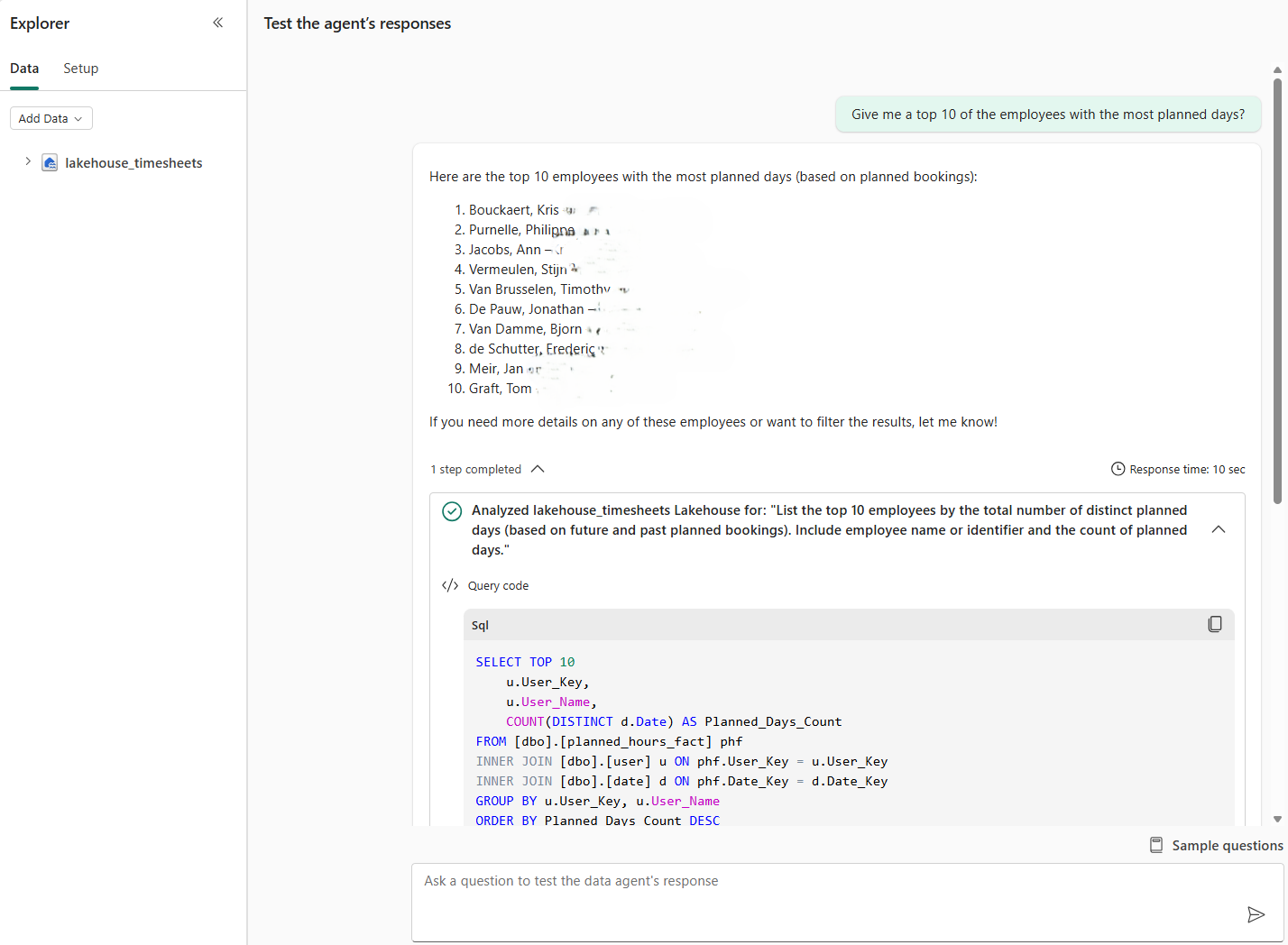
Figure 4: “Give me a top 10 of the employees with the most planned days?” on a lakehouse-based Fabric Agent
Vs the answer based on top of a semantic model:
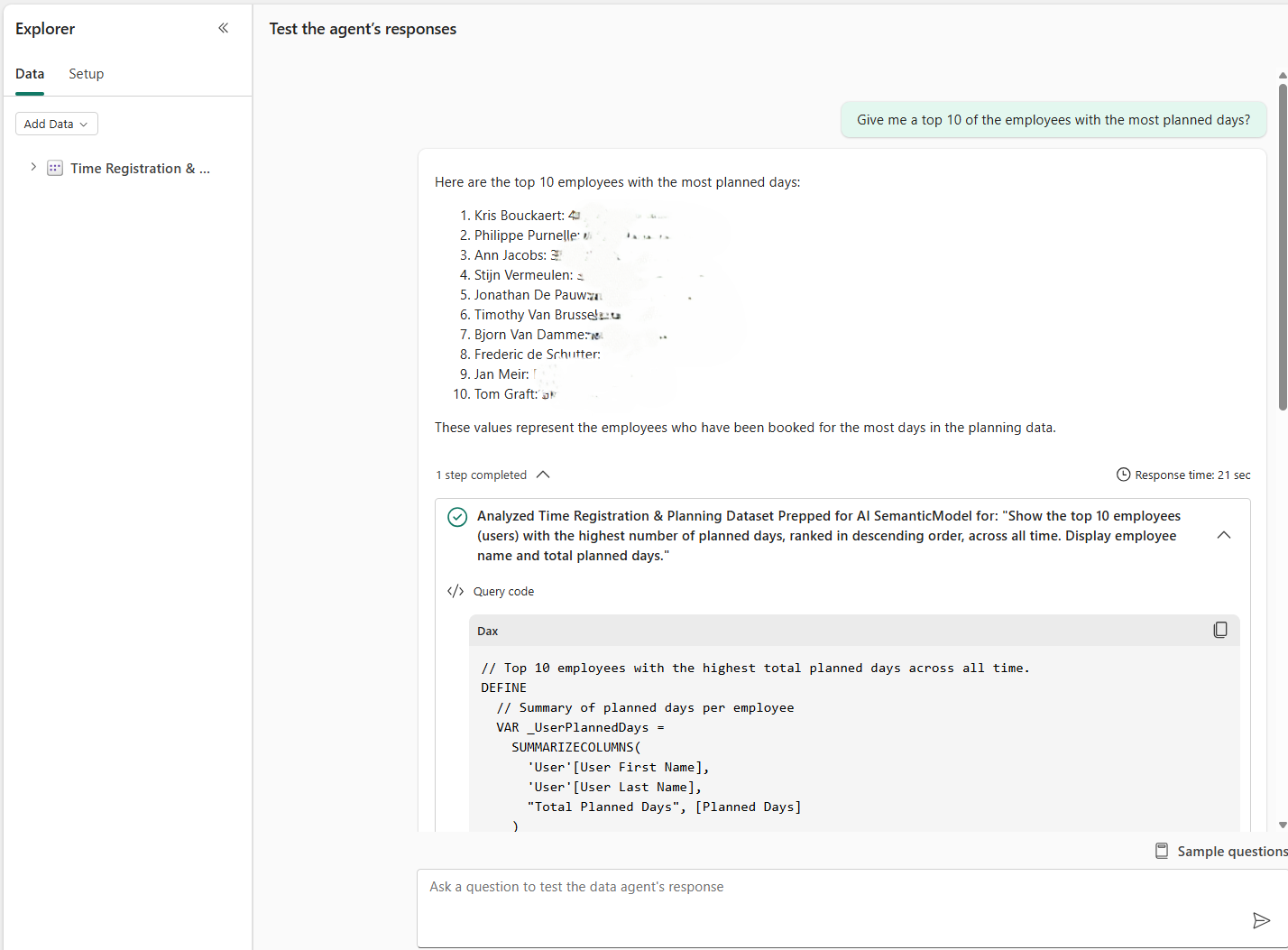
Figure 5: “Give me a top 10 of the employees with the most planned days?” on a semantic-based Fabric Agent
Why is the Power BI Semantic Model the preferred foundation for Conversational BI?
When I moved to the more specific question — asking about bookings for a specific client like 'element61' — the Lakehouse agent reached its limits. Although it properly asks for more information about the user input like instructed, it could not find the client ‘element61’ as element61 is stored as ‘**element61’. Even after adding instructions to use 'LIKE' statements in its SQL queries, it failed to bridge the gap.
This reveals the biggest problem and dealbreaker for the Lakehouse agent: it does not automatically match user input to values stored in the dataset.
The agent built on the Power BI Semantic Model excelled here and became my preferred choice for two vital reasons:
- Value Matching: It successfully matches user input (what people type) to stored values (how it is in the data), which is essential for accurate answers.
- Embedded Business Logic: It utilizes the DAX measures you have already defined. Concepts like ‘billed days’ don’t need to be redefined in the agent; it simply uses the existing "source of truth."
The answer based on top of a lakehouse:
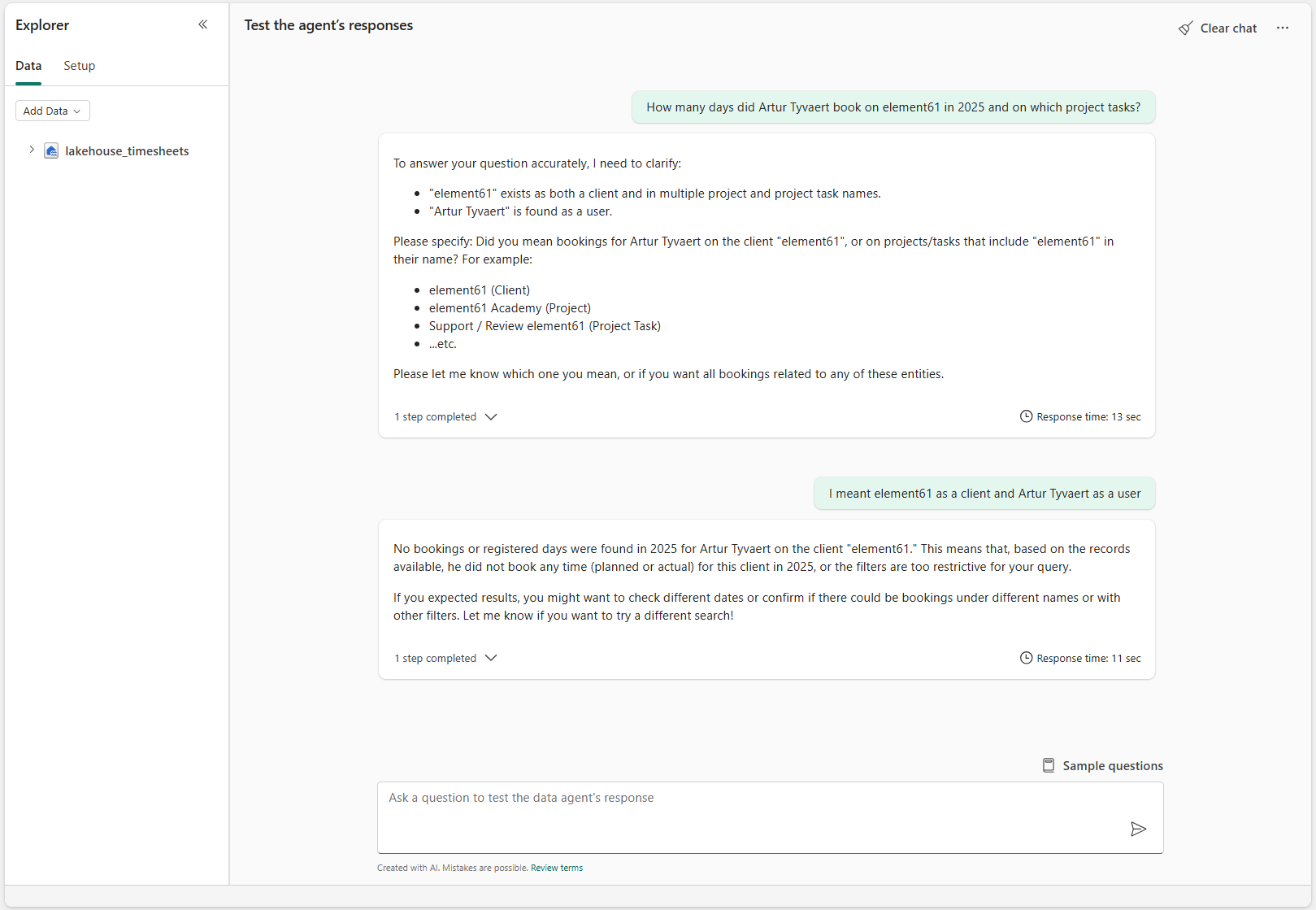
Figure 6: “How many days did Artur Tyvaert book on element61 in 2025 and on which project tasks?” on a lakehouse-based Fabric Agent
Vs the answer based on top of a semantic model:
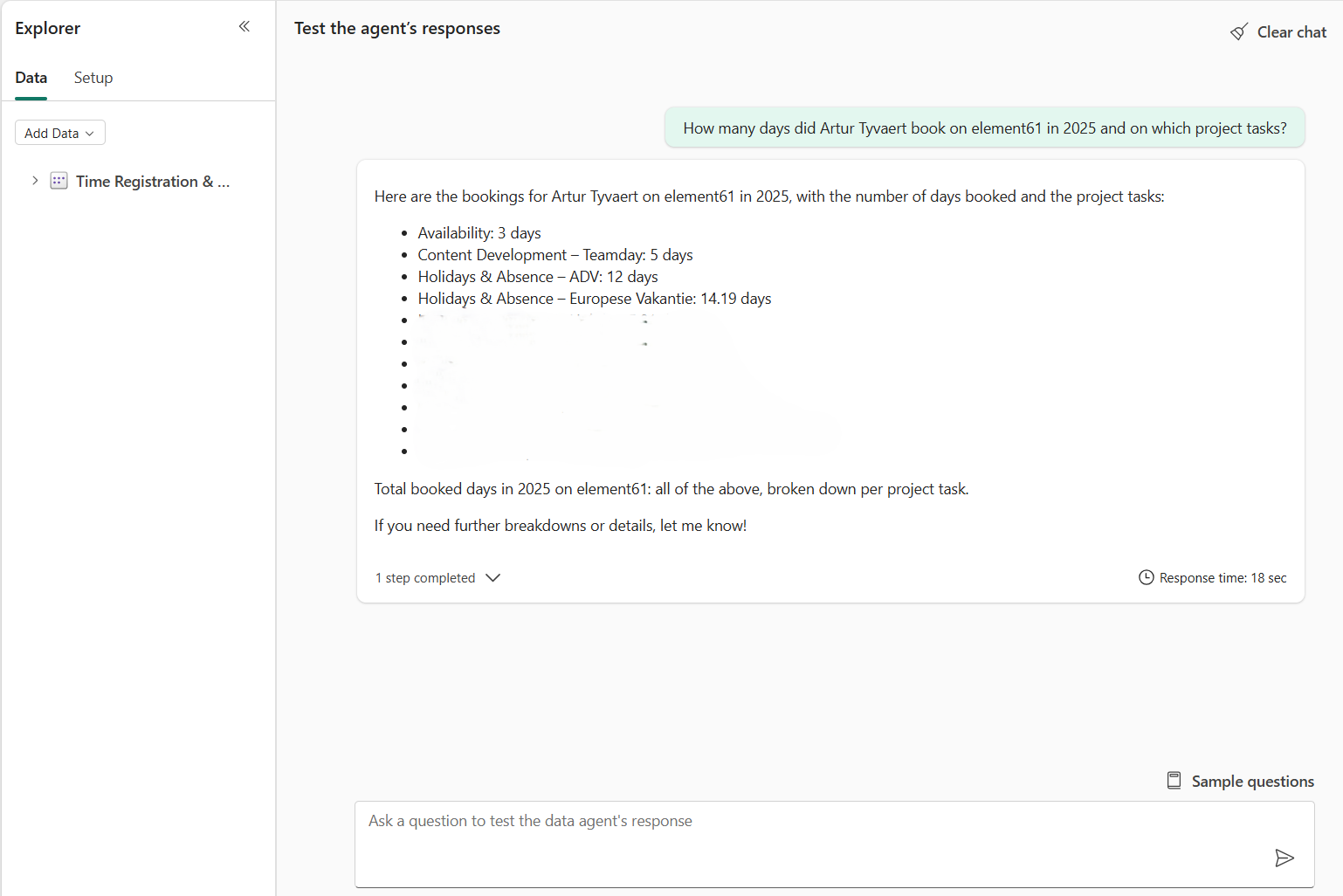
Figure 7: “How many days did Artur Tyvaert book on element61 in 2025 and on which project tasks?” on a semantic-based Fabric Agent
4.2 How should you configure your Fabric Data Agent for success
Now that we have established that the Semantic Model is the superior foundation for accuracy and business logic, the final question remains: how do we properly configure it to ensure users get the right answers every time? Configuration happens in two main stages: selecting your data and enhancing the AI's reasoning.
4.2.1 Step 1: How to add your data source and select tables
The first step is adding your semantic model and selecting the tables the agent should reason over. This is your opportunity to simplify the dataset — only expose what is relevant to the agent's purpose.
However, this step comes with a critical pitfall: table selection simplifies, but does not restrict. Even if you deselect certain tables, the agent may still answer questions about them. This feature is currently not a reliable governance mechanism. Always enforce data access through Table Permissions and Row-Level Security (RLS) in the underlying model.
4.2.2 Step 2: How to enhance responses through configuration
This is where the Fabric Data Agent truly differentiates itself from Copilot. Here it is important to add the right context in the correct place as not all information is used when generating your answer. You have two primary entry points for adding context:
- Data Agent Instructions — high-level instructions on behavior and communication
- Prep for AI — a dedicated section within your Semantic Model offering three deeper configuration layers:
- Data Source Instructions
- Verified Answers
- Column and table limiting
What should you include in the Data Agent Instructions?
Under the Setup tab of the Fabric Data Agent UI, you can define how the agent behaves.
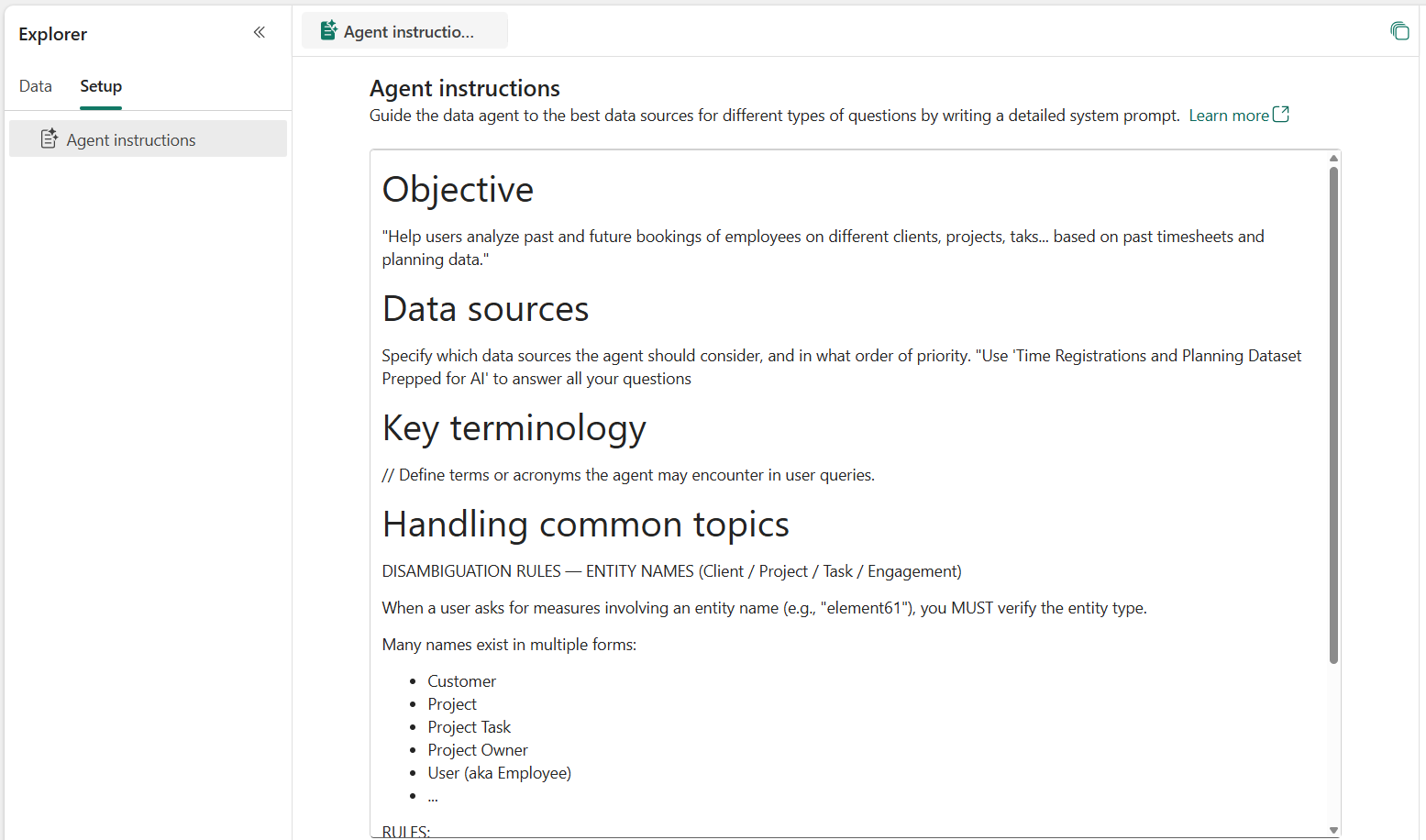
Figure 8: Adding data agent instructions to the Fabric Data Agent through the UI
The main areas to cover here are:
- Formatting: Should responses be tables, bullet points, or plain text?
- Data Source Descriptions: An overview of what each source contains.
- User Intent Interpretation: How should the agent handle ambiguity? For example: "When a user mentions 'element61', ask for clarification: is this a customer, a project, or something else?"
The last option is on a trial-and-error basis but is vital to the quality of your conversational BI tool. I started out without instructions and then analyzed what the agent had difficulties with. After adding some guidance to my agent instructions, unclear input was clarified and answer quality improved greatly.
How does "Prep for AI" within the Semantic Model optimize results?
The second configuration area is found directly in your semantic model via the ‘Prep data for AI’ button.
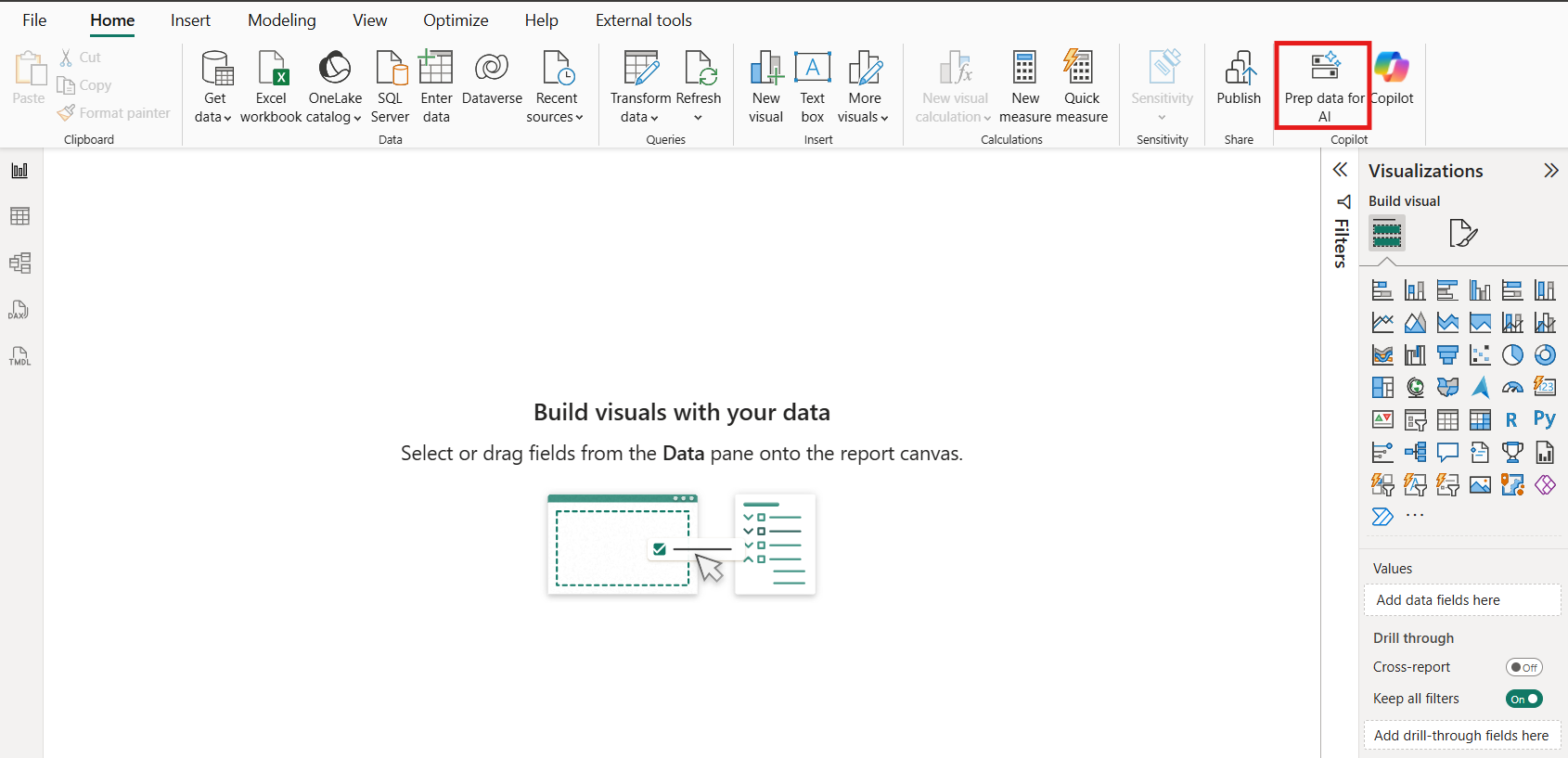
Figure 9: The ‘Prep data for AI’ feature in the semantic model
Here, you have three vital options:
- Simplify the Schema: Limit the tables and columns used (though, as noted, the agent may still "see" unselected data for now).
- Add verified Answers: Link specific questions to existing visuals in your model. While adding visuals to a model isn't always standard practice, it is currently required for high-quality Conversational BI.
- AI Instructions: Define business terminology not captured in measures. For example: "Define 'Availability' as unplanned days for consultants."
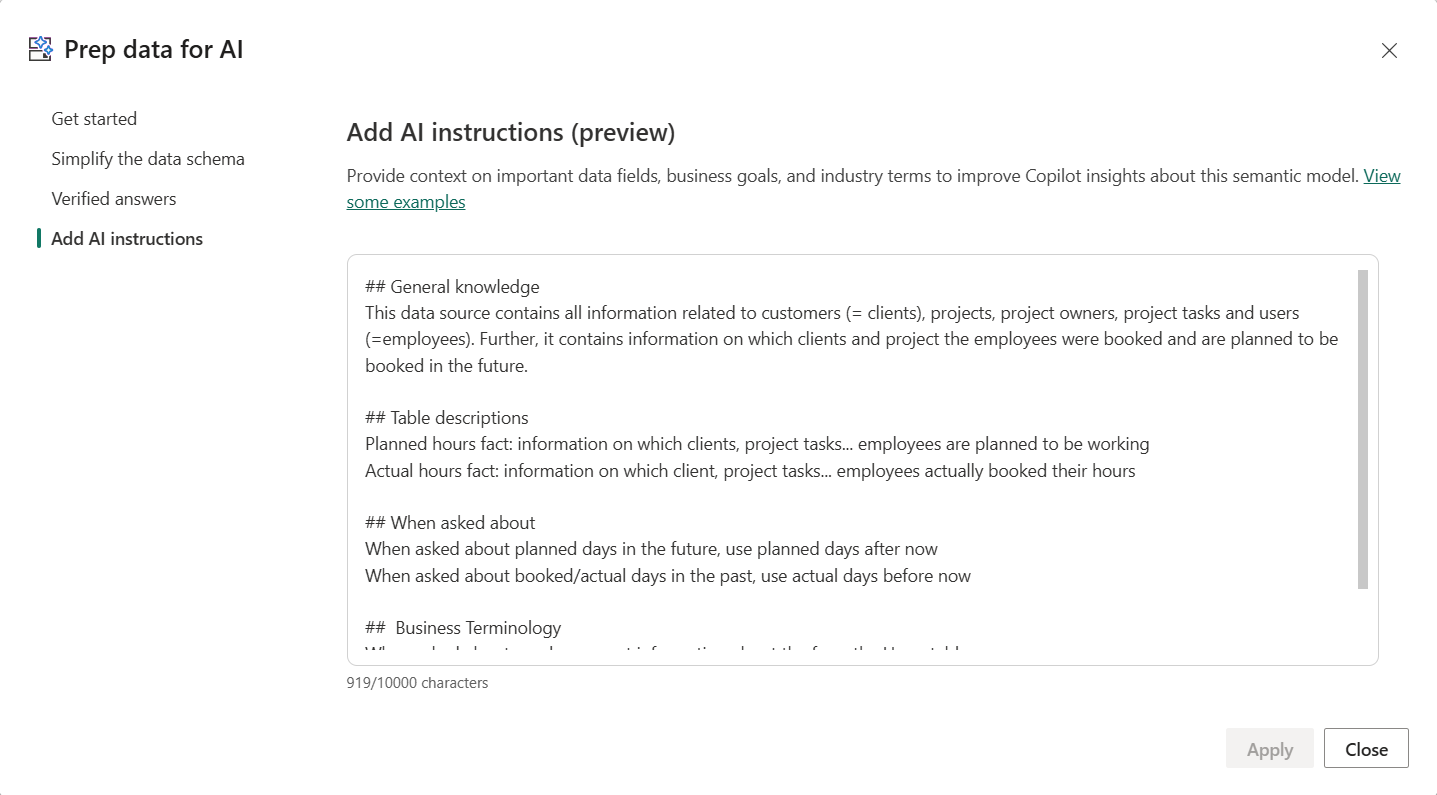
Figure 10: The different configurations options under ‘Prep data for AI’
What is the difference between Data Agent and Data Source instructions?
Important to grasp is the difference between the ‘Data Agent instructions’ and the ‘Data Source instructions’. As only the information of one is passed to the query generation engine, it is essential to add the correct information in the right place.
| Data Agent Instructions | Data Source Instructions | |
|---|---|---|
| Purpose | Scope, formatting, data source prioritization and user intent interpretation | Genuine business context that shapes how queries are constructed |
| Example | When a user mentions "element61", ask whether this refers to a customer, a project, or something else | What does "number of days of availability" mean in your data? |
| Passed to query engine? | No — only affects response presentation | Yes — directly influences query construction |
4.3 What are the Fabric Data Agent’s strengths and limitations?
At this point, our Fabric Data Agent is fully configured and ready to answer your business users' questions. And for the core use case of conversational Q&A on top of your data, it delivers.
Which questions does the Fabric Data Agent handle best?
The agent excels at retrieving specific metrics filtered by one or more dimensions, returning a clear and accurate answer. It can even combine multiple queries into one unified response. Typical successful questions include:
- "How many days is Artur Tyvaert planned on Client A next month?"
- "What are the total billable hours for element61 in Q3 2025?"
- "Which project tasks had the most overtime last quarter?"
Can the Fabric Data Agent perform independent data analysis?
If you are looking for the agent to perform deep, independent analysis — such as reasoning about root causes or identifying why certain trends occur — the honest answer is: not yet. The agent is a master of retrieval, but it falls short when asked to "think" like a data analyst.
How to overcome Fabric Data Agent’s limitations?
While the agent itself has limitations in reasoning, there is a powerful path forward for complex scenarios: the Model Context Protocol (MCP).
In an MCP context, the Fabric Data Agent becomes part of a larger, more intelligent system:
- An orchestrating agent (the "brain") constructs a research plan.
- It fires multiple, strategic questions at the Fabric Data Agent.
- The Fabric Data Agent acts as the reliable data retrieval layer.
- The orchestrator synthesizes those individual answers into a full, reasoned analysis.
By placing intelligent reasoning on top of the Data Agent, you move from simple Q&A to a tool that can truly assist in business decision-making.
5. Conversation BI in Fabric is ready; let’s talk
Conversational BI in Microsoft Fabric is genuinely powerful — but only when the right tool is matched to the right use case and configured properly.
Which tool should you choose for your business?
Whether you use Microsoft Copilot, the Fabric Data Agent, or an MCP setup, each unlocks real value. However, they come with distinct trade-offs that determine whether your users feel empowered or stuck:
- Microsoft Copilot: Best used as a navigator to help users find the right report or page within a vast workspace.
- Fabric Data Agent (on a Semantic Model): The preferred choice for a reliable source of truth that can answer specific, data-driven questions with high accuracy.
- MCP Orchestration: The advanced path for organizations that need autonomous reasoning and complex research plans on top of their data.
Getting that fit right is where the real difference is made.
How can we help you move forward
If you're evaluating a conversational BI setup, working through a configuration challenge, or simply want a second opinion on your approach — we're happy to think it through with you.
Curious how this compares beyond the Microsoft ecosystem? Keep an eye out for our next insight, where we will dive into conversational BI with Databricks Genie.