

1. The Power Duo: Why Databricks Genie and its Research Agent are a Game Changer
In our previous insight, we explored how Microsoft Fabric tackles the "dashboard maze." Whether you are in the Microsoft ecosystem or working with Databricks, the core challenge for business users remains the same.
Why do organizations still struggle to find the right insights?
As we established earlier, insights often get lost for four familiar reasons:
- Scattered Data: Information is spread across report pages, requiring users to manually combine it.
- Hidden Insights: Answers are buried behind filters that weren't designed for the user's specific question.
- High Manual Effort: Cross-referencing multiple reports to get one meaningful answer takes too much time.
- The "Last Mile" Gap: The data exists in the semantic model but never made it into a visual report at all.
This is exactly where Conversational BI comes in. While Fabric offers the Data Agent, Databricks is one of the pioneers in this area with its own solution: Databricks Genie.
2. What is Databricks Genie and how does it work
Databricks Genie allows users to interact with structured data in a natural Q&A format. Using generative AI, it translates business questions into SQL queries and provides answers through text, tables, and visualizations.
To put Genie to the test, I loaded element61's own timesheet and planning data directly into a Genie Space. I started with a simple straightforward query: "How many days was Artur Tyvaert booked at element61 in 2025 and on which project tasks?"
Genie handled this with ease, but what impressed me most was the transparency of the process. Genie doesn't just return a result; it allows you to follow its reasoning. You can expand the analysis panel to:
- Track the thinking process step-by-step.
- Inspect the SQL queries used to generate the answer.
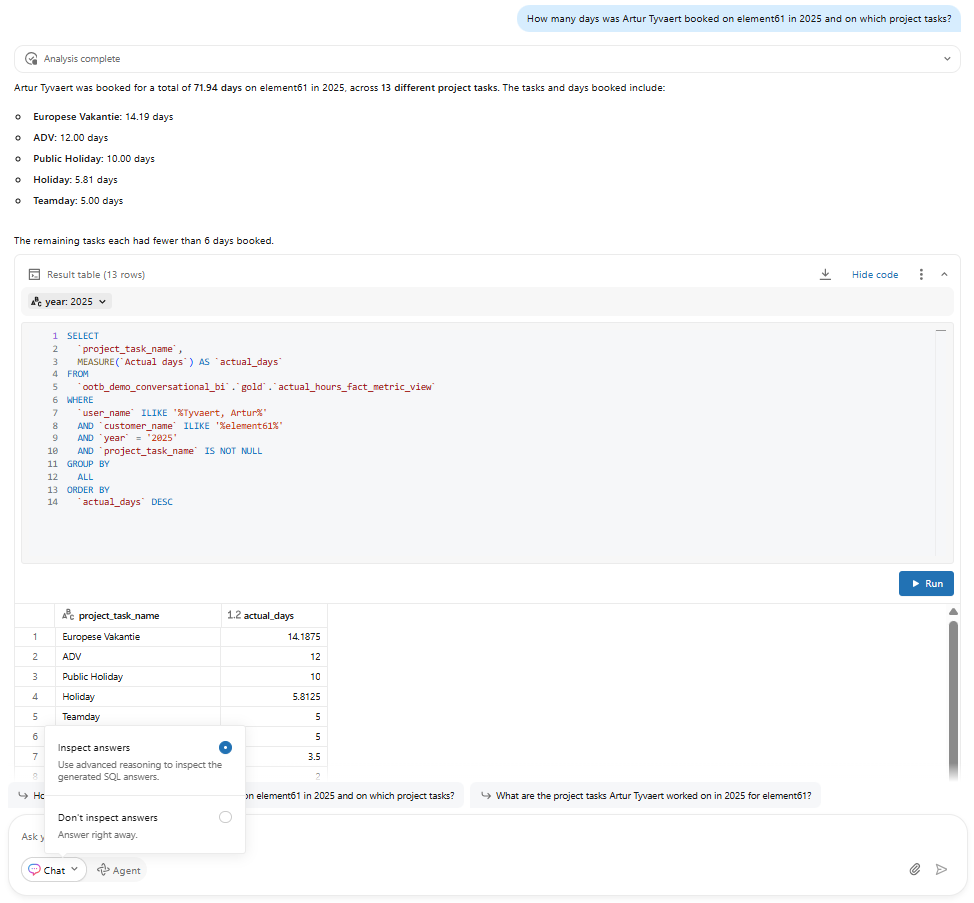
Figure 1: Genie answers easy questions in Inspect mode and displays the query used
How does the 'Inspect Answers' mode provide an additional layer of validation?
While the standard mode is already transparent, you can toggle on ‘Inspect answers’ for more complex scenarios. Think of this as a "double-check" mechanism where Genie applies advanced reasoning to verify its initial logic.
How does Genie further refine its own results?
In this mode, Genie takes a moment to validate its work before finalizing the response. It will:
- Verify its initial answers by running additional validation queries on limited data to double-check the logic and initial results
- Self-correct during the process. For example, if it spots a wrongly formatted name, it can automatically adjust its query with an ILIKE statement or use other columns until results are found.
In my experience, this adds an extra layer of trust. It’s not just about getting an answer; it’s about the added security of seeing your assistant verify its own work, making it even easier for the user to rely on the final result.
3. Why is the Research Agent a "Game Changer" for Databricks Genie
Most conversational BI tools stop at single-turn answers. Genie's Research Agent goes further. Switch from Chat to Research Agent and Genie shifts into a different mode entirely - unlocked with the push of a button.
This unlocks a fundamentally different class of questions. The same Genie Space, the same trusted data — but now capable of root cause analysis and building a full report along the way.
How does the Research Agent differ from the 'Inspect Answers' mode?
It is important to distinguish between these two modes:
- Inspect Answers (The "How" Mode): This is your enhanced Q&A mode. You ask a question, and Genie provides a result where you can verify every logic step.
- Research Agent (The "Why" Mode): You pose a broader business problem, and the agent investigates it autonomously. It doesn't just answer; it explores.
What happens when the Research Agent starts an investigation?
Instead of a direct response, the Research Agent:
- Builds a research plan that allows for multi-step reasoning.
- Runs multiple SQL queries to gather evidence from different angles.
- Learns from intermediate results and refines its approach on the fly.
- Delivers a structured report, complete with narrative, sources, and visuals.
Comparing Genie Chat vs. Research Agent: Which one should you use?
To make the difference concrete, I asked both Genie and the Research Agent the same deliberately vague question: "What are the employee trends for element61 in 2025 compared to 2024?" In the images below, you can see the striking difference.
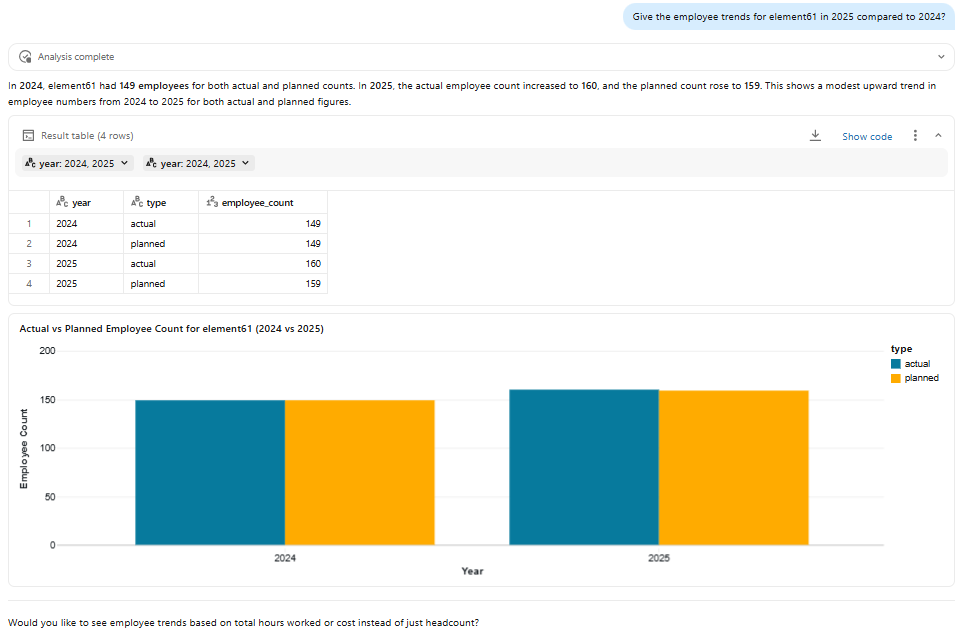
Figure 2: Genie analyzing the employee trends
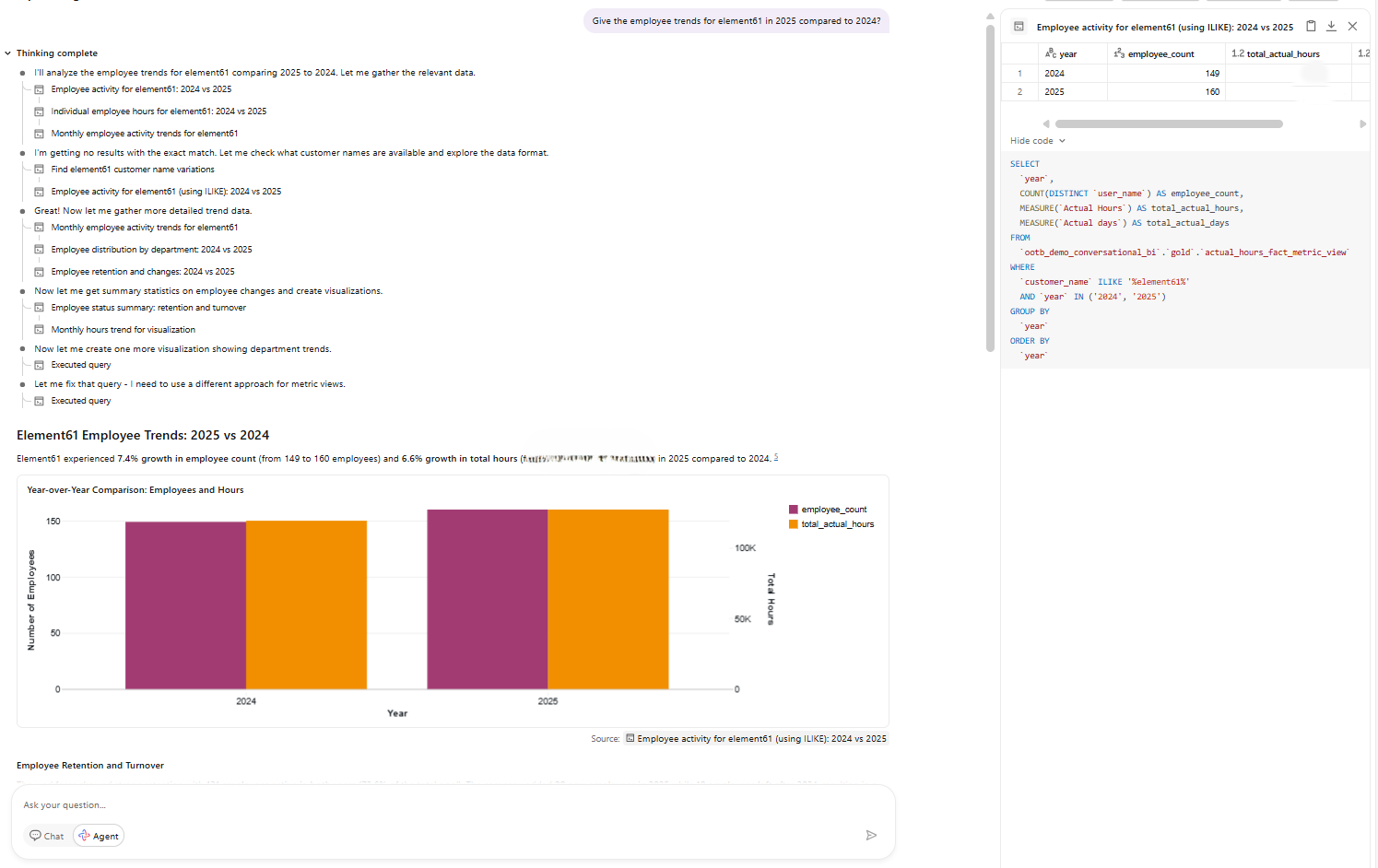
Figure 3: Agent mode analyzing the employee trends
Even with a vague question, the Research Agent independently decided which dimensions were worth investigating — retention rates, headcount evolution, departmental breakdowns — and delivered genuine trends, not just numbers.
| Genie (Chat) | Research Agent | |
|---|---|---|
| Approach | Answers the question as asked | Builds a research plan first |
| Output | Direct, singular answer | Structured report with narrative |
| Depth | Surface-level trend | Retention, new hires, department breakdown |
| Use case | Specific, well-defined questions | Vague, exploratory, or strategic questions |
And the transparency is still there: you can inspect its reasoning, review intermediate results, and examine the code used at every step.
With that said, the vaguer the question, the more queries that need to be run, and the longer it will take for Genie to come up with an answer. I would at least recommend pointing the Agent in a direction.
4. How does Databricks Genie handle Data Governance
Genie and its research agent are powerfull tools, but in an enterprise environment, they must operate within the governance framework of a company? Fortunately, for organizations concerned about security, the answer is simple: Genie’s access model is built entirely on Unity Catalog. There are no parallel permission systems to manage, ensuring a single source of truth for security.
How do you manage access rights in a Genie Space?
Because Genie lives natively inside the Databricks ecosystem, it inherits your existing security framework. To get a user up and running, keep these three steps in mind:
- Access rights are managed centrally through Unity Catalog — users need access to all tables and views present in the Genie Space, and any permission gaps are indicated
- Add users to the correct user group with the appropriate Unity Catalog permissions for that specific space
- Don't forget to grant that user group access to the assigned cluster — and you're set
5. Where can users access Databricks Genie
While Genie has a powerful native interface, it is not limited to the Databricks UI. Through the Databricks API, Genie can be embedded into any internal or external application, bringing conversational data access to where your users already work.
Can you integrate Genie with Teams or Slack?
Yes, Genie is increasingly integrated with everyday collaboration tools like Microsoft Teams, Slack, and SharePoint. However, there are two practical nuances to consider:
- Processing Overhead: External integrations may have slightly longer response times compared to the native Databricks UI.
- Feature Limitations: Currently, only the standard Genie Chat can be used through external tools. The Research Agent (with its "superpowers") is still exclusive to the native Databricks environment.
6. How do you evaluate and monitor Databricks Genie’s performance
Managing output quality in a GenAI application is a common challenge. Databricks addresses this by providing three out-of-the-box solutions: benchmarking, ongoing monitoring, and user-driven reviews.
How can you prevent "output drift" in Genie?
One of the most frequent questions from data teams with genAI applications is how to manage consistency as the model or data evolves. Databricks provides a native solution to monitor this issue through benchmarks:
- Ground Truth: You provide a business question along with its "ground truth" (the perfect SQL query).
- Validation: While this isn't used to train Genie, you can trigger these benchmarks at any time to compare Genie’s current answers against your defined standard.
- Quality Control: This allows you to objectively evaluate answer quality and link improvements (or regressions) directly to implemented changes.
How do you gain insight into how end-users interact with their data?
The Monitoring tab in your Genie space is one of the most valuable assets of the whole set-up. It gives insights into unfiltered user questions and provides a complete overview of the "Who, What, and When" of your data conversations.
- Conversation Logs: You can read through the actual dialogues between users and the AI.
- Query Inspection: You can see exactly which SQL queries were used to answer their questions.
- Security First: To see the actual data returned in an answer, you must rerun the query with your own credentials, ensuring that Unity Catalog permissions are always respected.
A note on Research Agent monitoring: To protect sensitive data, the Monitoring tab currently only displays the initial user question for Agent-mode sessions. The full chain of reasoning and intermediate queries is hidden, as these complex, multi-step investigations could potentially expose confidential information.How does user feedback improve Genie's accuracy?
How does user feedback improve Genie's accuracy?
The third instrument for quality control is direct User Feedback. Through ‘Ratings’ or ‘Review Requests’, end-users can flag the quality of an answer.
- This feedback appears directly in the Monitoring tab.
- It allows Genie builders to identify issues quickly and add relevant context or definitions where necessary, ensuring the tool gets smarter with minimal effort.
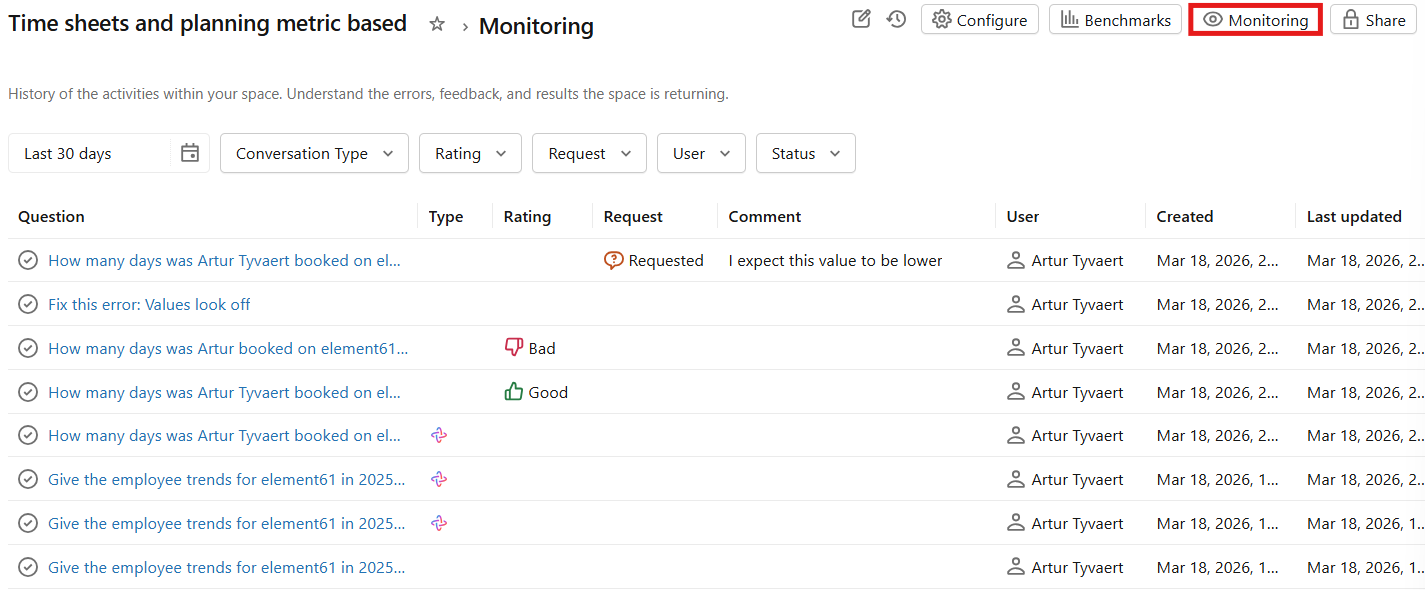
Figure 4: Monitoring data quality with direct user feedback
7. Ready to start the conversation
As we’ve explored in this series, the era of "searching for reports" is fading. Whether you followed our previous analysis on conversational tools in Fabric or are jumping in right here, one thing is clear: we are moving toward a world where data is a proactive partner.
Why Databricks Genie is a "Power Duo"?
While many tools stop at basic Q&A, Databricks pushes the boundaries of what’s possible:
- Genie Chat: Provides a transparent, SQL-backed interface for immediate answers you can trust.
- The Research Agent: Acts as an autonomous investigator, moving beyond the "what" to help you understand the "why" through multi-step reasoning.
Are you ready to build the future?
Using the right tool for your scenario is where the real difference is made. Whether you are evaluating a conversational BI setup, working through a configuration challenge, or simply want a second opinion on your approach—we’re happy to think it through with you.
Reach out to us at element61, and let’s explore how this technology can transform your organization.
What’s coming next?
The technology is ready, but the results are only as good as the instructions you provide. In our next insight, we will pull back the curtain on the Setup: how do you actually configure a Genie Space, provide the right business context, and "train" your agent to speak your language?