


We put Qlik's new agentic capabilities to work on a Telecom Churn use case. Four findings stood out. First, through Qlik's MCP server, Claude built and ran a working Qlik Automate workflow by conversation alone, provided it followed a well-documented build process. Second, inside Qlik Answers, Predict, Glossary, Data Product and Data Quality all work in plain language today. Third, the rough edges are practical rather than fundamental: mostly exact naming and a few undocumented behaviours. Fourth, the best way in is small: one governed data product and one automation.
Our first-hand take on Qlik Answers and the Qlik MCP Server
In June 2026, Qlik doubled down on its vision of being a "trusted intelligence layer for AI": analytics that no longer just informs, but reasons, predicts, and acts on governed data.
At element61, we like to stay close to where Qlik is heading, not just read the announcement. So over the following weeks, we got hands-on with these new agentic capabilities ourselves, building and stress-testing them on a Telecom Churn use case from start to finish, entirely through plain language.
Part 1 looks at what's now possible inside Qlik Answers, Qlik's own AI assistant: forecasting, business glossaries, data products, and data quality, all as conversational capabilities.
Part 2 looks at Qlik's MCP server, where an external AI assistant, Claude, built a working Qlik Automate workflow without the visual editor. The surprise: the real enabler wasn't the AI, but a well-documented build process.
We came away genuinely excited about where this is heading, and wanted to share what we found.
Part 1: Inside Qlik Answers

Figure 1: The Qlik Answers agent menu, with Help, Predict, Data product, Glossary, Data quality, Application analysis and Answers assistants.
1.1 Predict: forward-looking questions, no data scientist required
Predict turns a plain-language question into a forecast. Point it at a dataset, describe what you want to predict, and it walks you through the rest: which column to use as the target, training and comparing multiple models, explaining which one performed best and why, deploying it, and running it against new data, all from the same chat.
We tested this with a straightforward churn scenario on demo data: a training dataset of 1,000 customers with a known churn outcome, and a separate 2,000-customer dataset to score. Asked which column to predict, Predict recommended Churn, explained why, and suggested alternatives, trained and compared 7 algorithms, and picked a best model (Gaussian Naive Bayes: AUC 0.79, 87% recall, 62% precision) with a plain-language summary of which features mattered most. One command deployed it, and one more ran predictions across the full 2,000-customer batch. No modeling experience needed, and no waiting on a data science team.
One caveat when reading the results: the model flagged 66% of the 2,000 customers as likely to churn. That isn't a realistic churn rate. It reflects demo data, a model that favors recall (87%) over precision (62%), and the classification threshold (in our results, customers from roughly 0.3 churn probability upward were flagged). In other words, the model catches most real churners but also flags a fair number of customers who would have stayed. In a real project, you'd tune the threshold to the cost of a retention action.
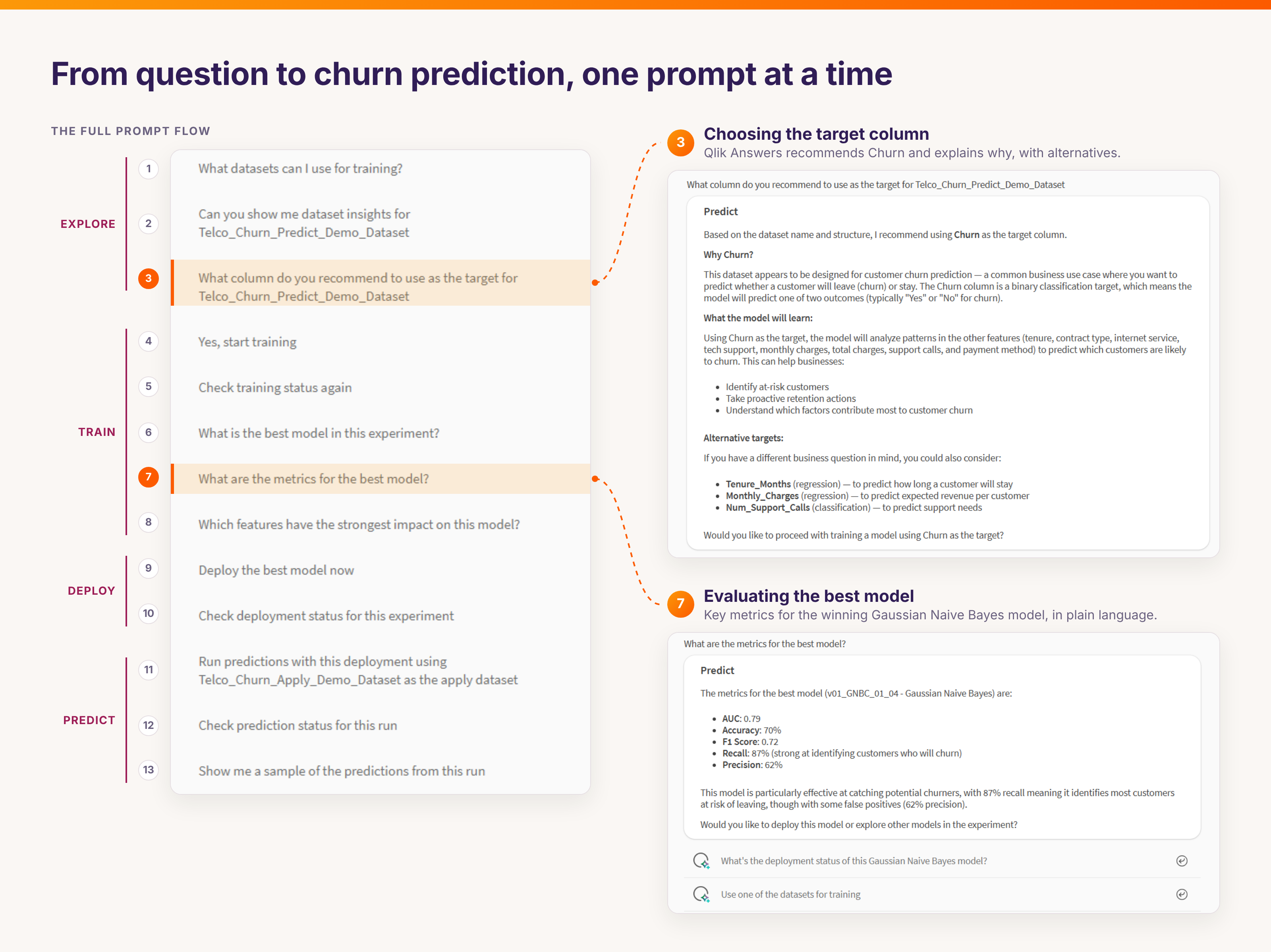
Figure 2: From question to churn prediction in 13 prompts, with Predict's target-column recommendation (prompt 3) and the best model's metrics (prompt 7).
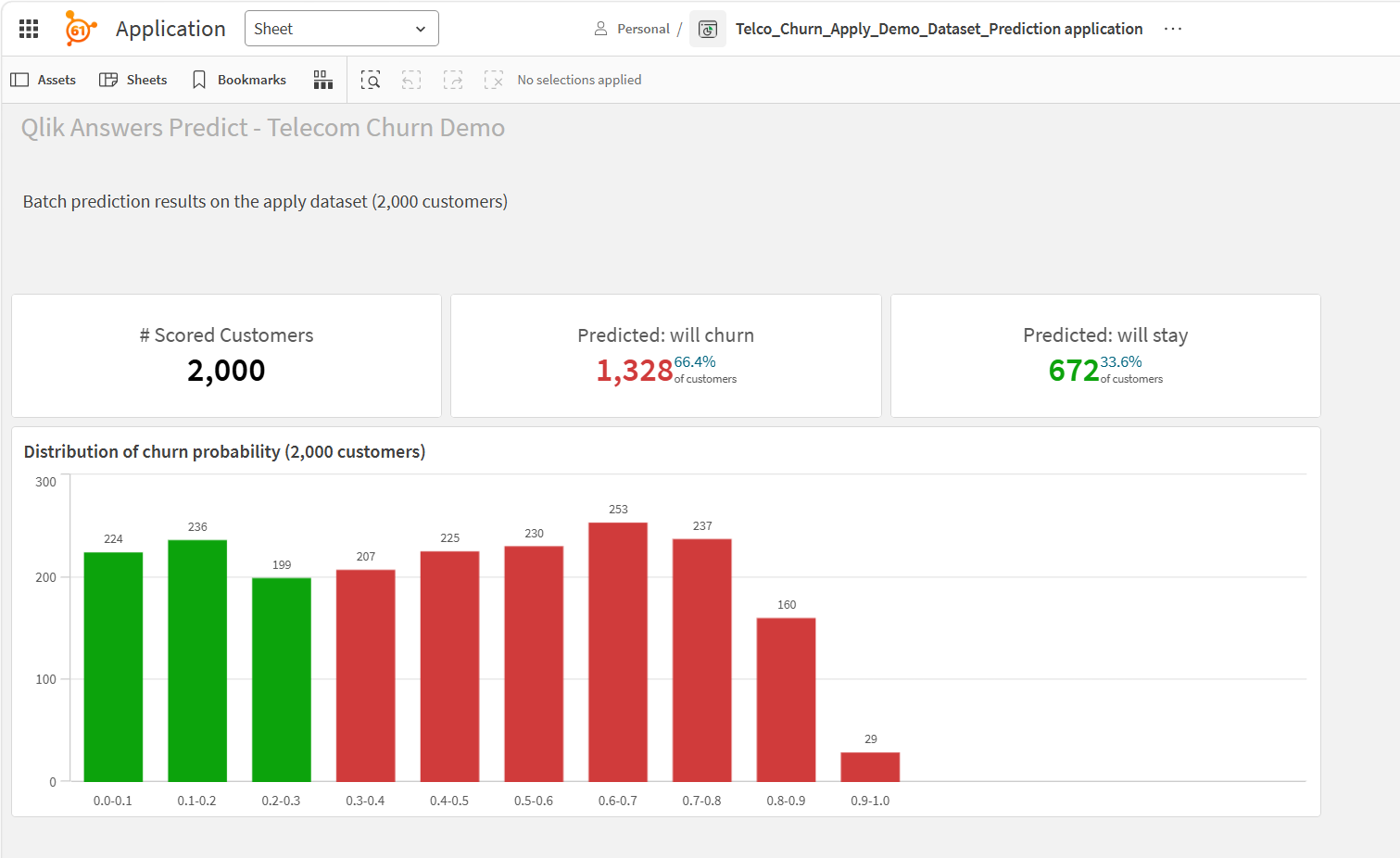
Figure 3: Batch prediction results for the 2,000 demo customers scored by the Predict model.
Predict is available inside Qlik Answers today. To get going, your organization needs a subscription that includes Qlik Predict (Premium or Enterprise in the current Qlik Cloud Analytics plans), a Professional user entitlement on user-based subscriptions, the right permissions, and enough Predict capacity. These are standard setup steps, although licensing and capacity are worth planning with your Qlik admin well before you start. One practical tip: for a full count of predictions, download the results file from your space rather than asking in the chat. It takes seconds and gives you the complete picture.
1.2 Glossary: definitions on demand, governance built in
Alongside Help, Predict, Data product, Data quality, Application analysis, and Answers assistants, Qlik Answers also exposes a Glossary agent: search, browse, generate, and manage business glossaries entirely in plain language, instead of through a separate governance tool bolted onto the side of the platform.
We tested it the same way, hands-on. First, we listed the glossaries already in our tenant, opened an existing finance glossary with 68 terms across 8 categories, and asked what a specific term, DSO/DPO, actually means. The answer didn't stop at a one-line definition: it broke the metric down into what it means, how it's calculated, and why it matters for working capital management.
Generating a glossary from scratch was just as straightforward. Describe what you want, point the agent at an existing dataset, and it builds the glossary for you: terms, categories, and field-level links included.
In our test, one prompt produced 10 terms across 3 categories, with definitions that read like a person wrote them, each one linked back to its source column. Every generated term starts as "draft". Reviewing and approving them, or adding a missing one, takes just as little effort.
One practical tip: asking "show me details for glossary X" only returns metadata (name, space, description), not the actual terms. Ask "what terms are in glossary X" instead for the full list with definitions.
1.3 Data Product: governing the bundle before you trust the agent

Figure 4: The data product agent reporting status, linked datasets, Trust Score and quality metrics for Telecom Churn Analytics.
Where Glossary gets you to a shared vocabulary, Data Product is where Qlik Answers tries to turn a set of datasets into something a business user, or another agent, can actually trust and reuse. We built this end to end on our Telecom Churn use case: through chat alone, we created a "Telecom Churn Analytics" data product, bundled our training and scoring datasets into it, linked it to the business glossary we'd generated earlier, set tags and an owner, and activated it.
Of the Qlik Answers capabilities we tested, this one was the least forgiving with conversational shortcuts like "this data product": we consistently had to spell out the full name to avoid resolution errors.
The more interesting find was the Trust Score. It's one of the core trust signals Qlik attaches to data products, and it lines up with Qlik's broader push to make data products a governed, AI-ready unit. Our score (64.73 at the time of our screenshot) aggregated across quality dimensions like completeness, validity, usage, and discoverability, and it moved between queries in the same session, so it's a live metric, not a one-time check. At data product level, it's the average of the trust scores of the datasets inside it. Availability depends on your subscription, so it may not be visible in every tenant.
1.4 Data Quality: making the trust score explainable
If the data product's metrics tell you validity sits at 71.83% (with a Trust Score of 64.73), Data Quality is where you find out why and try to fix it. We checked the existing rules on our Telecom Churn dataset (none), asked whether reusable rule templates existed (none either), then had it create 2 rules from plain-English descriptions: "Tenure_Months must be positive" and "Payment_Method should never be null". Both came back as reviewable proposals showing the actual logic and field mapping before we applied them: a welcome contrast to a black-box AI feature.
The bulk option, "create AI-generated validation rules for this dataset", is more of a mixed bag: it scans the whole schema and proposes one rule per field. We ended up cancelling several just to keep our test focused, and our attempts to scope it to specific fields only worked inconsistently.
Two things stood out. First, the same conversational fragility we saw with Data Product shows up here too: even an exact, correctly spelled dataset name sometimes failed to resolve. Second, on the substance: adding a rule doesn't automatically push the Trust Score up; it just makes the measurement stricter. Our own score dipped slightly after a rule flagged a legitimate edge case (a brand-new customer with 0 months of tenure) as invalid. It's a useful reminder that writing the rule well matters as much as writing the rule at all.
Part 2: Qlik's MCP Server, a new way to build
2.1 Automations by conversation, without the visual editor
The most valuable thing to come out of this part of our test wasn't the automation itself, but the build process behind it. With Qlik's MCP server, an AI assistant like Claude can build a Qlik Automate workflow through plain conversation. It only does so reliably, though, when it follows a well-documented, tested build process instead of guessing. Qlik publishes an official automation skill on GitHub (qlik-automation) that guides an AI assistant through building automations. We started from that skill and extended it with what we learned in a real tenant, from silent block-name failures to stale connection tokens. That hardened version is where our expertise sits, and it's what turns an impressive demo into something you can repeat.
Not long ago, building a Qlik Automate workflow meant knowing your way around connectors, blocks, and the visual editor itself. That's changing: describe what you want to happen, and the assistant figures out how to build it, connector by connector, block by block.
Under the hood, the MCP server exposes the tools to create, update, run, and delete an Automate automation, resolve which connectors and connections it should use, and inspect its run history. Point any AI assistant that speaks MCP at your tenant, and it can build an automation the same way a person would in the visual editor.
We tested this end to end on our Telecom Churn use case. Working entirely in chat with Claude, without opening the visual Automate editor, we built a real alert automation: a first version that sends a Microsoft Teams test message, then a data quality gate on the actual dataset the model scores, then a live churn KPI and a rendered chart pulled straight from the app and embedded in the alert. The automation stays silent when the data is healthy and only messages the team, with context, when it isn't. Every step, including two full test runs, happened in the same conversation.
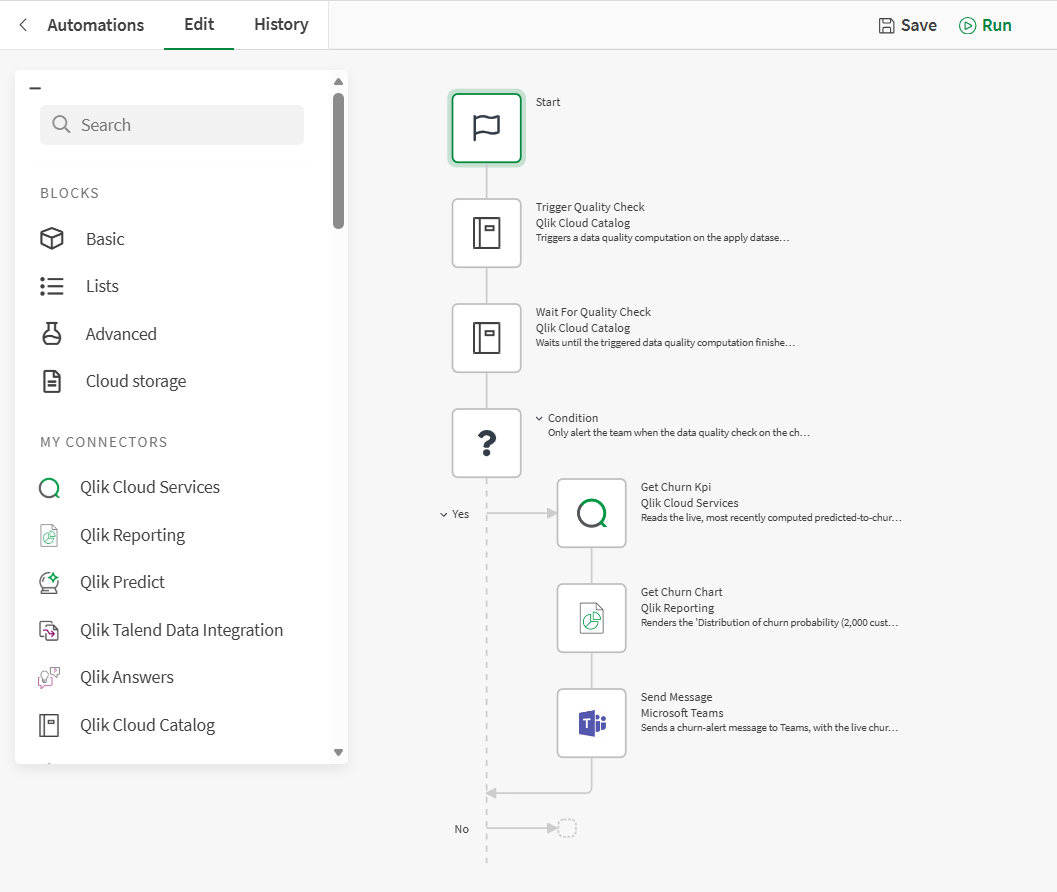
Figure 5: The finished Telecom Churn Alert automation, built by Claude through Qlik's MCP server: a data quality gate, then a live churn KPI and chart sent to Microsoft Teams.
This doesn't manufacture capability out of nowhere. Connectors still need to be authenticated and governed, same as any automation you'd build by hand, and, as noted above, the AI assistant needs that documented build process to produce a valid automation instead of guessing. Our test surfaced exactly the kind of rough edges that process has to account for: a reference to a wrongly named building block fails silently instead of throwing an error, a Microsoft Teams channel's internal ID sometimes has to be looked up with its own small automation first, and a connection that still shows "Connected" in the interface can be carrying a dead token that only a full reconnect fixes. None of that is a blocker. Each is exactly the kind of edge case a documented process closes off for good once it's been hit.
Worth flagging on its own: Qlik's June announcement put the spotlight on the new Automate Agent, which lets users trigger pre-built workflows from Qlik Answers. The MCP server's automation tools go a step further: an external assistant like Claude can build the workflow itself. It might be the most practical of everything we tested.
What we'd advise: where to start
For most Qlik Cloud customers, the question isn't whether to use these capabilities, but where to begin. Our advice:
- Start with one governed data product. Bundle the datasets behind a single, well-understood use case, link a business glossary, and add a handful of data quality rules. Trusted answers, predictions and automations all build on that foundation.
- Pick one forward-looking question for Predict. Choose a use case with a clear action attached, such as churn, and validate precision and the threshold before anyone acts on the output.
- Automate one alert through the MCP server. A data quality gate or KPI alert is low-risk and shows value quickly. Invest in a documented build process from day one, so the second automation is faster than the first.
- Check licensing and capacity early. Your subscription tier, Professional entitlements, Predict capacity, and Qlik Answers question capacity (which MCP usage draws on too) determine what's available in your tenant
Closing thought
What stood out most wasn't any single feature: it was how much of this is already usable today, in plain language, without a data science team or a trip through a visual editor. We hit a few rough edges along the way, mostly around exact naming and a couple of undocumented behaviors, the kind that get smoother with a documented, tested way of working, not the kind that should hold anyone back from starting.
We're excited about where Qlik is taking this, and we'll keep testing it as it evolves. If you'd like a hand applying any of this to your own tenant, or want to see any of this in action, reach out to element61.
Sources
- Introducing the Next Evolution of Agentic Analytics in Qlik
- Qlik MCP server | Qlik Cloud Help
- Qlik Answers | Qlik Cloud Help


